Managing your inbox can feel overwhelming. According to McKinsey, the average professional spends 28% of their workday reading and responding to emails. That’s over 11 hours every week just sorting through your inbox. This constant flow of emails drains productivity and leaves little time for focused work.
AI email automation effectively addresses this issue. It transforms how we manage our inboxes, giving back precious time. James Fair, Senior Security Architect for Executech says “Incorporating AI into daily workflows isn’t just about convenience—it’s about reclaiming time for high-impact work.”
If you’re ready to reclaim your time and reduce inbox stress, AI email management with Microsoft Copilot in Outlook is the solution you need.
Let’s explore how Microsoft Copilot AI can improve your Outlook experience and increase your teams’ productivity.
Discover how AI can simplify your daily email tasks and boost productivity.
Microsoft Copilot isn’t just another add-on. It’s a smart email assistant designed to handle the repetitive, time-consuming aspects of email management. From summarizing threads to drafting replies, Copilot enhances your workflow and lets you focus on what matters most.
Here’s how it changes the game.
Lengthy email chains are productivity killers. Instead of digging through endless replies, Copilot provides concise summaries of key points.
This feature is a cornerstone of efficient emailing, saving hours each week.
Staring at a blank screen, wondering how to reply? Copilot drafts responses based on email context, maintaining a professional tone.
This automated email replies feature helps you manage a heavy inbox without sacrificing quality.
A cluttered inbox can lead to missed opportunities. Copilot uses AI to sort and flag important emails, so you don’t miss a thing.
This intelligent email sorting ensures that critical messages don’t slip through the cracks.
Coordinating meetings often means back-and-forth emails. Copilot’s AI-driven scheduling eliminates this hassle.
This feature boosts Outlook productivity by streamlining scheduling tasks.
Copilot doesn’t stop at emails. It also analyzes attachments, providing summaries without opening each file.
This feature supports smart workplace communication, especially when dealing with reports or proposals.
Keeping track of follow-ups is critical, but easy to overlook. Copilot automates this process.
This ensures no task or deadline slips through the cracks.
| More articles you might like |
|---|
Microsoft Copilot in Outlook offers practical solutions to streamline daily tasks and enhance productivity. Let’s look at the practical ways Copilot enhances your day-to-day workflow.
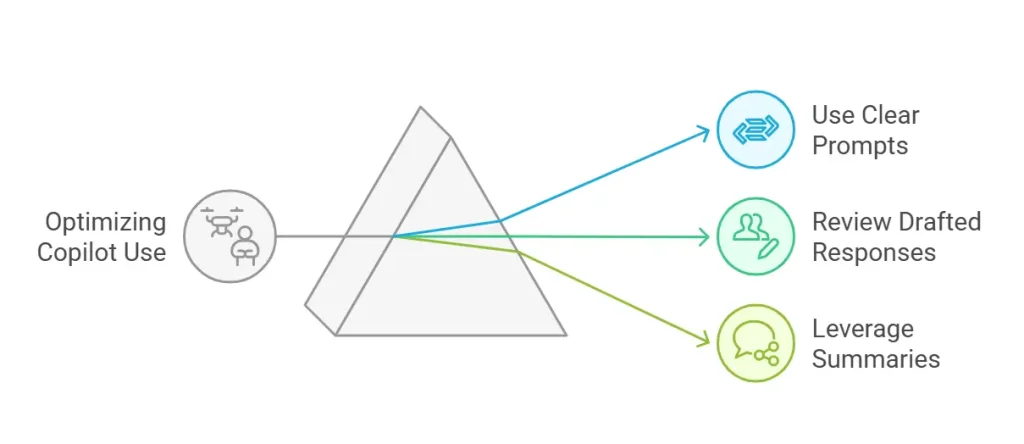
Getting the most out of Copilot requires a few simple but effective strategies. By following these tips, you can optimize your experience and improve productivity.
Follow these simple strategies to maximize the benefits of Copilot:
Microsoft Copilot’s integration in Outlook brings a host of benefits to professionals across industries.
These Outlook Copilot benefits make it a vital tool for modern workplaces.
Knowing the differences between Standard Outlook and Copilot-Enhanced Outlook can help you choose the best tools for your workflow.
Below is a comparison to highlight these distinctions:
| Feature | Standard Outlook | Copilot-Enhanced Outlook |
|---|---|---|
| Email Summarization | Manual reading required | AI-generated concise summaries |
| Drafting Responses | Fully manual drafting | AI-assisted draft suggestions |
| Intelligent Sorting | Basic filters and rules | AI-driven sorting by urgency and relevance |
| Scheduling Meetings | Manual coordination | AI-driven calendar syncing and invites |
| Analyzing Attachments | Manual file review | AI-generated attachment insights |
| Follow-Up Reminders | Manual task setting | Automated reminders and task management |
Managing your inbox doesn’t have to be a time sink. With AI email management through Microsoft Copilot in Outlook, you can streamline email tasks, improve communication, and reclaim valuable time.
| Explore Trusted IT Consulting Services Near You: | ||
|---|---|---|
| Phoenix | Sacramento | Bellevue |
| Renton | Utah | Salt Lake City |
| Kent | Federal Way | Seattle |
| Spokane | Tacoma | Kirkland |
Executech helps businesses leverage AI tools like Microsoft Copilot to enhance productivity and reduce operational inefficiencies. With a 98% client satisfaction rate, we’re trusted by businesses to implement solutions that drive results.
Contact us today to learn how you can transform your email workflow with AI-driven tools.
